Page Templates
Complete pages that you can assign to a page with a single click.
- Page template: Product Page
- Page template: Category Page
- Page template: Accessories Product Page
- Page template: Industry Page
- Page template: Customer Support Parent Page
- Page template: Customer Support Category Page
- Page template: Customer Support Article Page
- Page template: 404 Page
- Page template: Accessories Parent Page
- Page template: Accessories Category Page
- Page template: Accessories Sub-Category Page
- Page template: Page resource parent
- Page template: Page resource section
- Page template: Page resource article
- Page template: Offices Global
- Page template: Offices Regional
- Page template: Careers Job Listing
- Page template: Careers Why Waterlogic
- Page template: Careers Home Page
- Page template: Careers Browse
- Page template: Careers Locations
- Page template: Careers Submit CV
- Page template: Leaders
- Page template: Leaders direct
- Page template: Section site search results
- Page template: Site wide search results
- Page template: Cost Calculator Form
- Page template: Cost Calculator Results
Page template: Product Page
Product page.
A full page template, consisting of multiple content block section templates, layouts and fields, combined with template variable settings and lexicon.
Category: Pages - Product
Sections on this page where content is not controlled by content blocks:
- Hero area: Product Hero Details
- Hero area: Button group (if 'Add to quote') and phone number (dropdown)
- Variable columns: Product Specification
- Tabbed content: FAQs
- Tabbed content: Specs > Product Specification (on the left)
- Product CTA: button (if 'Add to quote')
All other content can be controlled on the individual resource, by editing the content blocks fields, layouts and templates.
Example of front end view (top half of page):

Page template: Category Page
Category page.
A full page template, consisting of multiple content block section templates, layouts and fields, combined with template variable settings and lexicon.
Category: Pages - Product
Sections on this page where content is not controlled by content blocks:
- Technology slider
- FAQs
All other content can be controlled on the individual resource, by editing the content blocks fields, layouts and templates.
Example of front end view (top half of page):

Page template: Accessories Product Page
Accessories Product page.
A full page template, consisting of multiple content block section templates, layouts and fields, combined with template variable settings and lexicon.
Category: Pages - Product
Sections on this page where content is not controlled by content blocks:
- Qty selector and 'Add to quote' button
- Phone number (Dropdown)
All other content can be controlled on the individual resource, by editing the content blocks fields, layouts and templates.
Example of front end view:
Page template: Industry Page
Industry page.
A full page template, consisting of multiple content block section templates, layouts and fields.
Category: Pages
Example of front end view:
Page template: Customer Support Parent Page
Customer Support Parent page.
A full page template, consisting of multiple content block section templates, layouts and fields, combined with template variable settings and lexicon.
Category: Pages - Customer Support
Sections on this page where content is not controlled by content blocks:
- FAQs
- Contact banner
All other content can be controlled on the individual resource, by editing the content blocks fields, layouts and templates.
Example of front end view:
Page template: Customer Support Category Page
Customer Support Category page.
A full page template, consisting of multiple content block section templates, layouts and fields, combined with template variable settings and lexicon.
Category: Pages - Customer Support
Sections on this page where content is not controlled by content blocks:
- Sidebar: Grey Help box (option to inherit from template, or override on a per page basis)
- Sidebar: Blue CTA box (option to inherit from template, or override on a per page basis)
- FAQs
- Contact banner
All other content can be controlled on the individual resource, by editing the content blocks fields, layouts and templates.
Example of front end view:
Page template: Customer Support Article Page
Customer Support Article page.
A full page template, consisting of multiple content block section templates, layouts and fields, combined with template variable settings and lexicon.
Category: Pages - Customer Support
Sections on this page where content is not controlled by content blocks:
- Sidebar: Grey Help box (option to inherit from template, or override on a per page basis)
- Sidebar: Blue CTA box (option to inherit from template, or override on a per page basis)
- FAQs
- Contact banner
All other content can be controlled on the individual resource, by editing the content blocks fields, layouts and templates.
Example of front end view:
Page template: 404 Page
404 page.
A full page template, consisting of multiple content block section templates, layouts and fields.
Category: Pages
Example of front end view:

Page template: Accessories Parent Page
Accessories Parent page.
A full page template, consisting of multiple content block section templates, layouts and fields, combined with template variable settings and lexicon.
Category: Pages - Accessories
Sections on this page where content is not controlled by content blocks:
- Categories sidebar links
All other content can be controlled on the individual resource, by editing the content blocks fields, layouts and templates.
Example of front end view:

Page template: Accessories Category Page
Accessories Category page.
A full page template, consisting of multiple content block section templates, layouts and fields, combined with template variable settings and lexicon.
Category: Pages - Accessories
Sections on this page where content is not controlled by content blocks:
- Categories sidebar links
All other content can be controlled on the individual resource, by editing the content blocks fields, layouts and templates.
Example of front end view:

Page template: Accessories Sub-Category Page
Accessories Sub-Category Page.
A full page template, consisting of multiple content block section templates, layouts and fields, combined with template variable settings and lexicon.
Category: Pages - Accessories
Sections on this page where content is not controlled by content blocks:
- Categories sidebar links
All other content can be controlled on the individual resource, by editing the content blocks fields, layouts and templates.
Example of front end view:

Page template: Page resource parent
A full-page template, consisting of multiple content block section templates, layouts and fields, combined with template variable settings and lexicon.
Category: Pages - Articles
MODX Template: 02_Resource_article_parent
Any article parent must use the 02_Resource_article_parent template to set the article content type fields
All content can be controlled on the individual resource, by editing the content blocks fields, layouts and templates.
Example of front end view:

Page template: Page resource section
A full-page template, consisting of multiple content block section templates, layouts and fields, combined with template variable settings and lexicon.
Category: Pages - Articles
MODX Template: 03_Resource_article_section
Any resource designated to be an article section must use the Modx Template 03_Resource_article_section as this changes the view of the resource to present child articles in a more user-friendly way.
Sections on this page where content is not controlled by content blocks:
- Section articles
All content can be controlled on the individual resource, by editing the content blocks fields, layouts and templates.
Example of front end view:

Page template: Page resource article
A full-page template, consisting of multiple content block section templates, layouts and fields, combined with template variable settings and lexicon.
Category: Pages - Articles
MODX Template: 01_Resource_article
All articles should use the Modx template 01_Resource_article. By default, any article created directly from the Article section resource will have the 01_Resource_article automatically applied. The 01_Resource_article template provides more template variables for featured images and tags.
All content can be controlled on the individual resource, by editing the content blocks fields, layouts and templates.
Example of front end view:

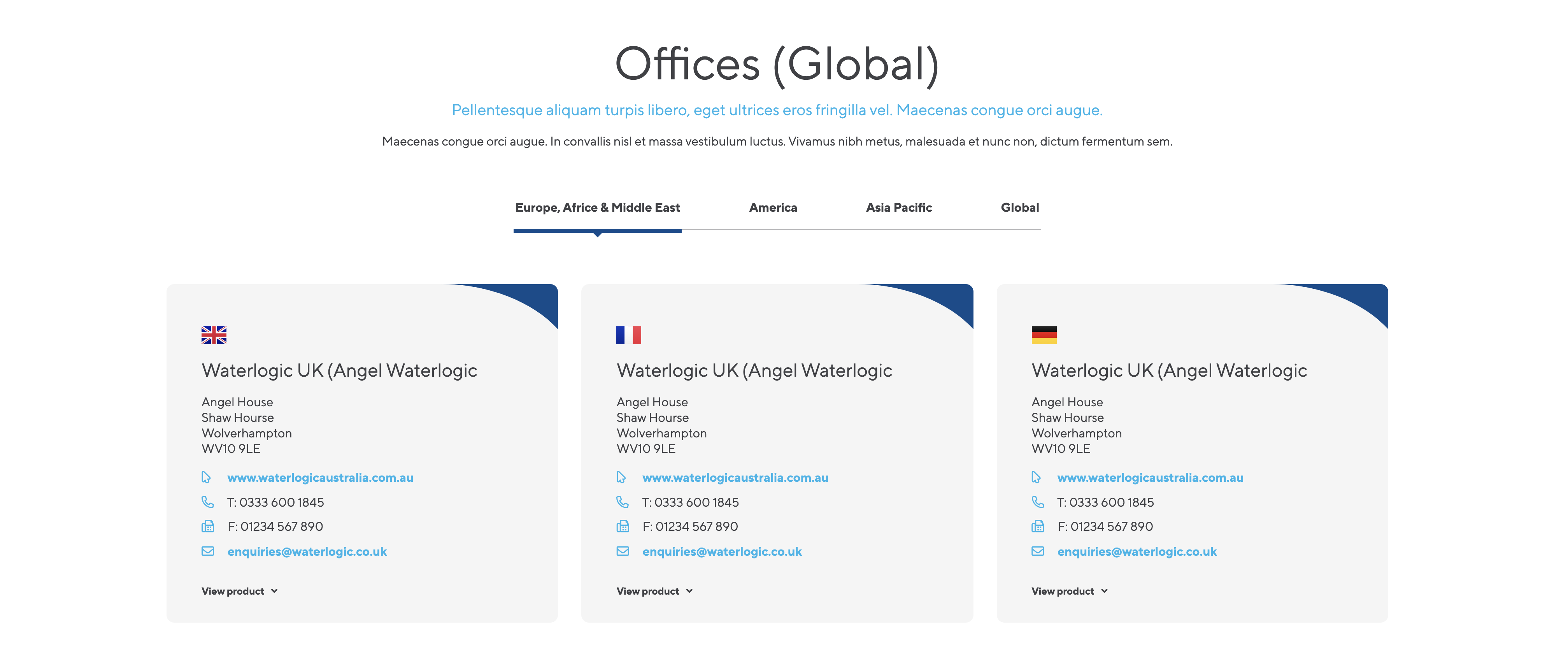
Page template: Offices Global
A full-page template, consisting of office locations controlled by custom manager page.
Category: Pages
Simple layout using a 100% layout for content above the office locations. Content can be added below and above as required using content block layouts and fields. Each "Global" area (e.g. America) the regional offices will display within tabs.
Example of front end view:
Layouts and fields Used:
Page template: Offices Regional
A full-page template, consisting of office locations controlled by custom manager page.
Category: Pages
Simple layout using a 100% layout for content above the office locations. Content can be added below and above as required using content block layouts and fields.
Example of front end view:

Layouts and fields Used:
Page template: Careers Job Listing
A full page template, consisting of multiple content block section templates, layouts and fields, combined with template variable settings and lexicon.
Category: Careers
-
This page has been set up to be fully customisable within content blocks for full flexibility. Each Job listing should use the Career_Job_Template as Template variables are used to define settings for each job listing
Template Variables
Job Details: Reference information used elsewhere is the site
Job Location: The location of the Job
Job Department: The department within WL (This should match the Career Department Tag(s). See below).
Job Address: The address of the job listing
Each of the above template variables are used in searches and other relevant areas within the careers area and should all contain content for full consistency and search functionality. The resource must be published to show in search results.
Figure 1
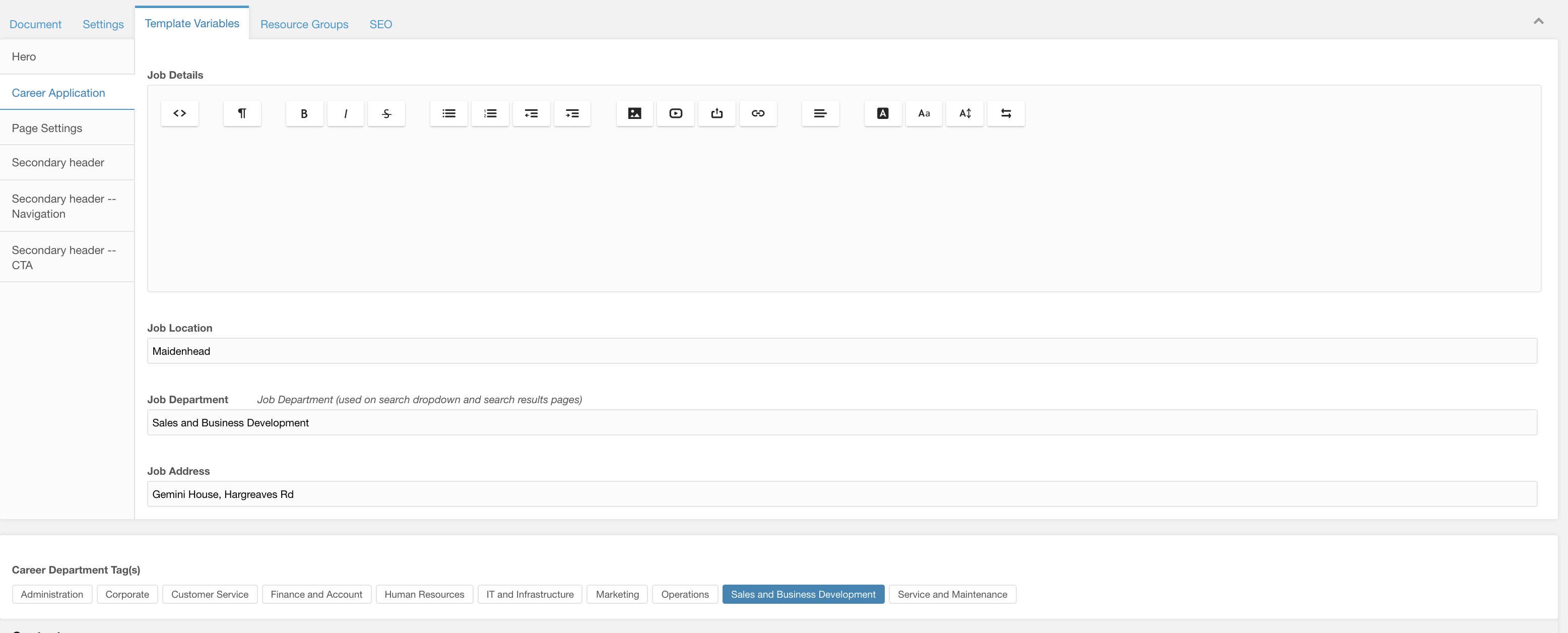
Career Department Tag(s)
Select a department where this job listing apply’s too. You can only select one and they are setup using lexicons so each career area within each country will show the correct language.
Example of front end view (top half of page):
Figure 2

Fields and Layouts used:
Layout: 100%
Layout: Nested Layout
Layout: Colour Image Split
Field: Job Listing Top
Field: Career Apply Form
Field: Image
Field: Rich Text
Field: Testimonial Video
Page template: Careers Why Waterlogic
A full page template, consisting of multiple content block section templates, layouts and fields, combined with template variable settings and lexicon.
Category: Careers
Full content block template using the career content template. This is required rather than the default template as search functionality for the careers is used within the template.
Figure 1

Fields and Layouts used:
Layout: Career Search Banner
Layout: 100%
Layout: Branded Slider Layout
Field: Image
Field: WL Icon Text
Field: Font Awesome Icon
Field: Rich Text
Field: Testimonial Video
Page template: Careers Home Page
A full page template, consisting of multiple content block section templates, layouts and fields, combined with template variable settings and lexicon.
Category: Careers
Sections on this page where content is not controlled by content blocks:
- Hero area: Template variables with title, content and background images
All other content can be controlled on the individual resource, by editing the content blocks fields, layouts and templates.
Example of front end view (top half of page):
Figure 1


Fields and Layouts used:
Layout: 100%
Layout: Variable Columns
Field: Heading
Field: Icon List
Field: Image
Field: Rich Text
Field: Testimonial Video
Page template: Careers Browse
A full page template, consisting of multiple content block section templates, layouts and fields, combined with template variable settings and lexicon.
Category: Careers
This template has a fixed area (search Banner and results) automatically displayed at the top of the page. All other content areas can be controlled via the resource. This template changes the resource into a collection for easy management of job listings.
Adding a new Job Listing:
Figure 1

Defining the Results Page
To allow the search banner throughout the site to know where the results should be displayed a Context setting has been created allowing you to define the results page.
Setting Name -> career_search_parent
Namespace -> Waterlogic
Topic -> Career
Figure 2

This needs be set to this resource within this context.
Defining the Search Type
You can toggle between search types globally trough the context settings. See Career Search Banner field for more information
Example of front end view (top half of page):
Figure 3


Fields and Layouts used:
Layout: 100%
Field: Image
Field: Rich Text
Field: Testimonial Video
Page template: Careers Locations
A full page template, consisting of multiple content block section templates, layouts and fields, combined with template variable settings and lexicon.
Category: Careers
Full content block template using the career content template. This is required rather than the default template as search functionality for the careers is used within the template.
Example of front end view (top half of page):
Figure 1

Fields and Layouts used:
Layout: Banner Image Overlap
Layout Career Search Banner
Layout: Branded Slider Layout
Layout 33% 33% 33%
Layout: 100%
Field: Locations List
Field: WL Icon Text
Field: Image
Field: Rich Text
Field: Testimonial Video
Page template: Careers Submit CV
A full page template, consisting of multiple content block section templates, layouts and fields, combined with template variable settings and lexicon.
Category: Careers
Full content block template using the career content template. This is required rather than the default template as search functionality for the careers is used within the template.
Figure 1

Fields and Layouts used:
Layout: Career Submit CV Form
Layout: 100%
Layout: Branded Slider Layout
Field: Heading
Field: Rich Text
Page template: Leaders
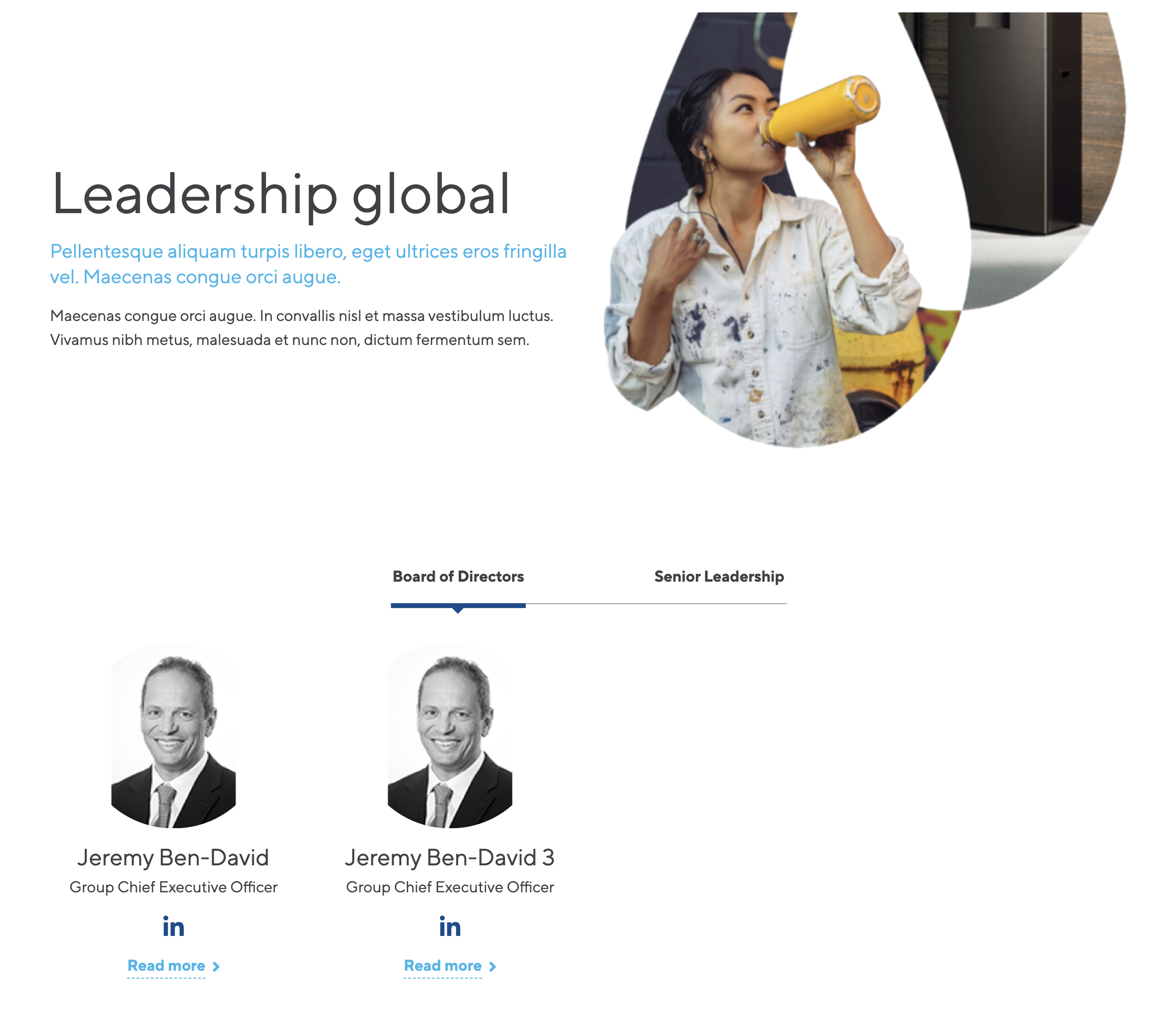
Global leaders page
A full page template, consisting of a hero and a Leaders field
Category: Pages
Sections on this page where content is not controlled by content blocks:
- Leaders
All other content can be controlled on the individual resource, by editing the content blocks fields, layouts and templates.
Example of front end view:
Page template: Leaders direct
Direct leaders page
A full page template, consisting of a hero and a Leaders field and image banner
Category: Pages
Sections on this page where content is not controlled by content blocks:
- Leaders direct
All other content can be controlled on the individual resource, by editing the content blocks fields, layouts and templates.
Example of front end view:

Page template: Section site search results
Section site search results page
A full page template, consisting of a hero search results an FAQ section and a contact banner
Category: Pages
Sections on this page where content is not controlled by content blocks:
- Search results
All other content can be controlled on the individual resource, by editing the content blocks fields, layouts and templates.
Example of front end view:

Page template: Site wide search results
Site wide search results page
A full page template, consisting of a hero search results and a contact banner
Category: Pages
Sections on this page where content is not controlled by content blocks:
- Search results
All other content can be controlled on the individual resource, by editing the content blocks fields, layouts and templates.
Example of front end view:

Page template: Cost Calculator Form
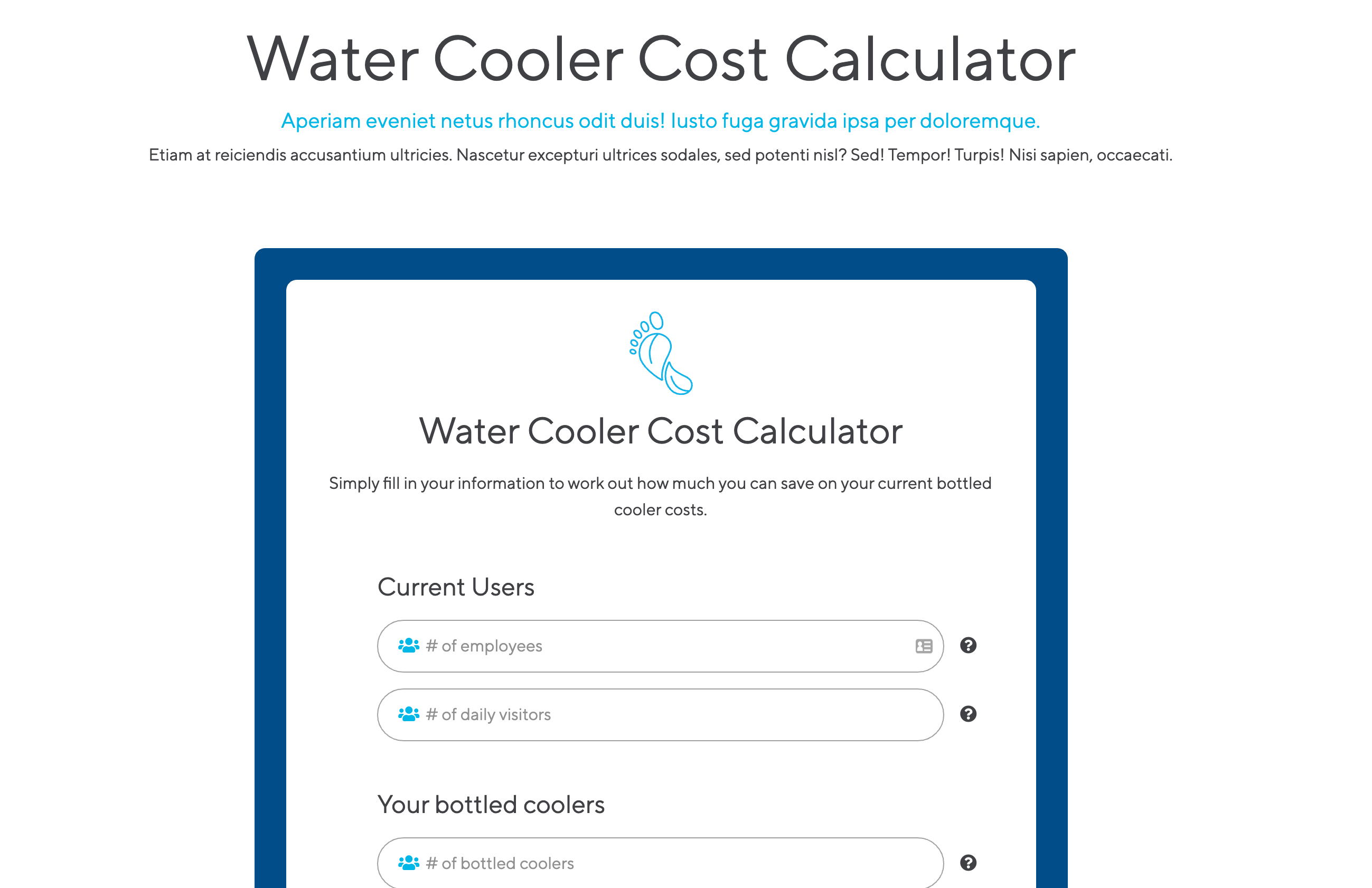
A full page template, consisting on simple header, and cost calculator form field.
Category: Pages
Example of front end view (top half of page):
Figure 1
Fields and Layouts used:
Layout: 100%
Field: Heading
Field: Rich Text
Page template: Cost Calculator Results
A full page template, consisting of cost calculator results from form submitted, rich text and call to action banners.
Category: Pages
Cost calculator results are automatically generated by the form submitted on the resource containing the cost calculator form field. To manage content within the results (calculation variables and text content) see Cost Calculator Results layout.
Example of front end view (top half of page):
Figure 1

Fields and Layouts used:
Layout: 100%
Layout: 33% 33% 33%
Layout: Cost Calculator Results
Field: WL Icon CTA
Field: Rich Text