
Field: Article Side Whitespace CTA
Article Side Whitespace CTA.
Article CTA areas, available to be set inline by default to content and offset on desktop to right or left.
Category: Waterlogic Fields - Articles
Content Blocks Documentation: https://docs.modmore.com/en/ContentBlocks/v1.x/Fields/index.html

Example of Article Side Whitespace CTA (left, right and inline):
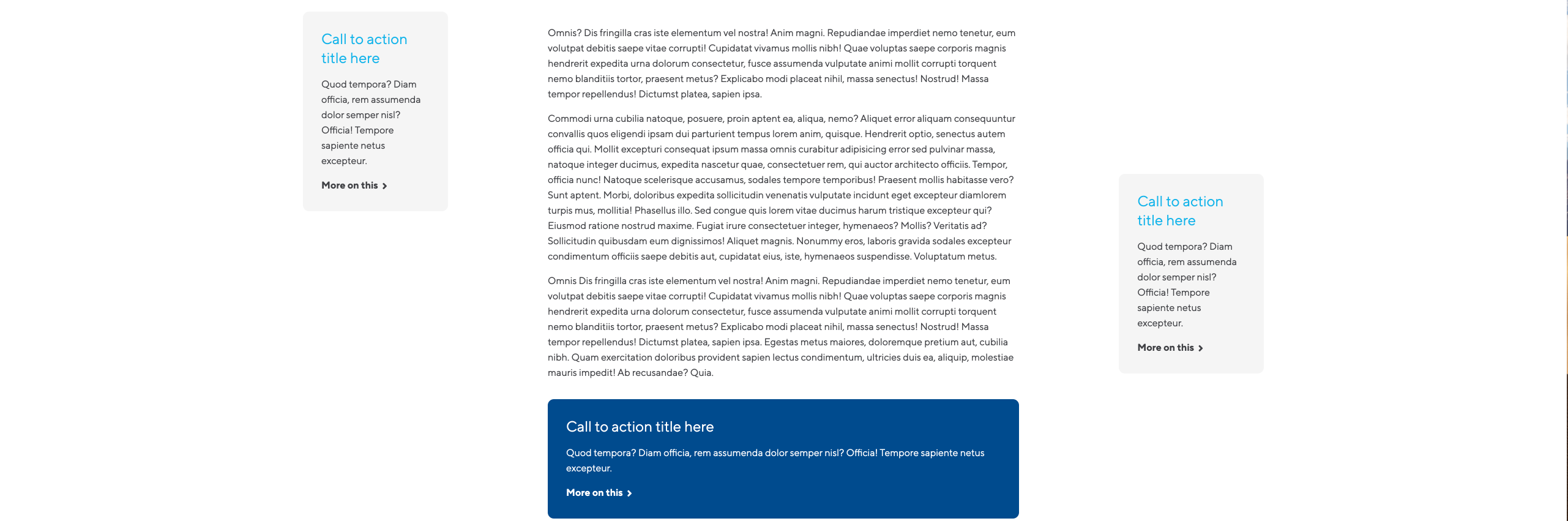
Note: when field is used, the main article content width should be:
- Col-8 between 1200px and 1600px.
- Col-6 between 992px and 1199px.
Additional Settings: (as found within field cog, highlighted in blue)

Settings
Position: The location of the CTA banner (Either inline, Left of content or right of content. Default to Inline.
Heading: Heading content at top of call to action banner.
Content: Content to appear within call to action banner.
-
- Resource ID - The resource ID that the button should link to
- External URL - An external url (e.g. https://www.google.co.uk)
- Modal - The ID of the modal popup as defined in the Modal Popup content block
- Scroll to ID - The section that you would like this button to scroll to. Defined by Layouts
Hyperlink Text: The text to display within the link
Hyperlink Destination: The location where this hyperlink should go to. Relevant to the Hyperlink Type setting.